 HealthSave
Before you start
- A machine that stays on. A laptop works for a trial. For daily use, pick a NUC, Mac mini, Synology NAS, Proxmox VM or small Linux server. A baseline of 2 vCPU and 4 GB of RAM covers everything except local AI.
- Docker Compose v2, running. Use Docker Desktop on macOS, Docker Engine on Linux, or Docker Desktop with WSL integration on Windows.
- HealthSave on your iPhone. Background sync to your server needs HealthSave Pro, a one-time purchase.
- The same network. Your iPhone has to reach the server. Start on your home network.
Install
curl -fsSL https://raw.githubusercontent.com/umutkeltek/healthsave-observatory/main/install.sh | bashThe installer checks out the newest tagged release and opens a guided setup. Choose Basic setup.
On Windows, run the same flow from PowerShell. It hands off to WSL2:
irm https://raw.githubusercontent.com/umutkeltek/healthsave-observatory/main/install.ps1 | iexRather read it first? Clone the repository and run the CLI from there:
git clone https://github.com/umutkeltek/healthsave-observatory.git
cd healthsave-observatory
./healthsave onboard
What Basic setup does
- Writes
.envandconfig.yaml, and keeps them if they already exist. - Generates your API key, dashboard password, and database and Grafana passwords.
- Turns on the local analysis jobs, which need no AI model.
- Starts the database, migrations, API, worker, web dashboard and Grafana.
- Leaves local AI, MQTT and Home Assistant off until you choose them.
Check the stack
healthsave doctor| Service | Address | Who can reach it |
|---|---|---|
| Observatory web | http://localhost:4173 | This machine, until you set WEB_BIND |
| API | http://<server-lan-ip>:8000 | Your network, with the API key |
| Grafana | http://localhost:3000 | This machine, until you set GRAFANA_BIND |
Sign in to the dashboard with the password that healthsave pair shows. You can change it later in Settings, under Web sign-in.
Connect your iPhone
healthsave pairThis prints your server URL and API key.
With a QR code
Install qrencode and healthsave pair also prints a QR code (brew install qrencode or apt install qrencode). Scan it with the iPhone Camera, open it in HealthSave, check the server address and tap Connect.
By hand
- In HealthSave, open Settings, then Server Sync under Self-Hosted Analytics.
- Tap Set destination and enter the server URL and API key.
- Allow Local Network access when iOS asks.
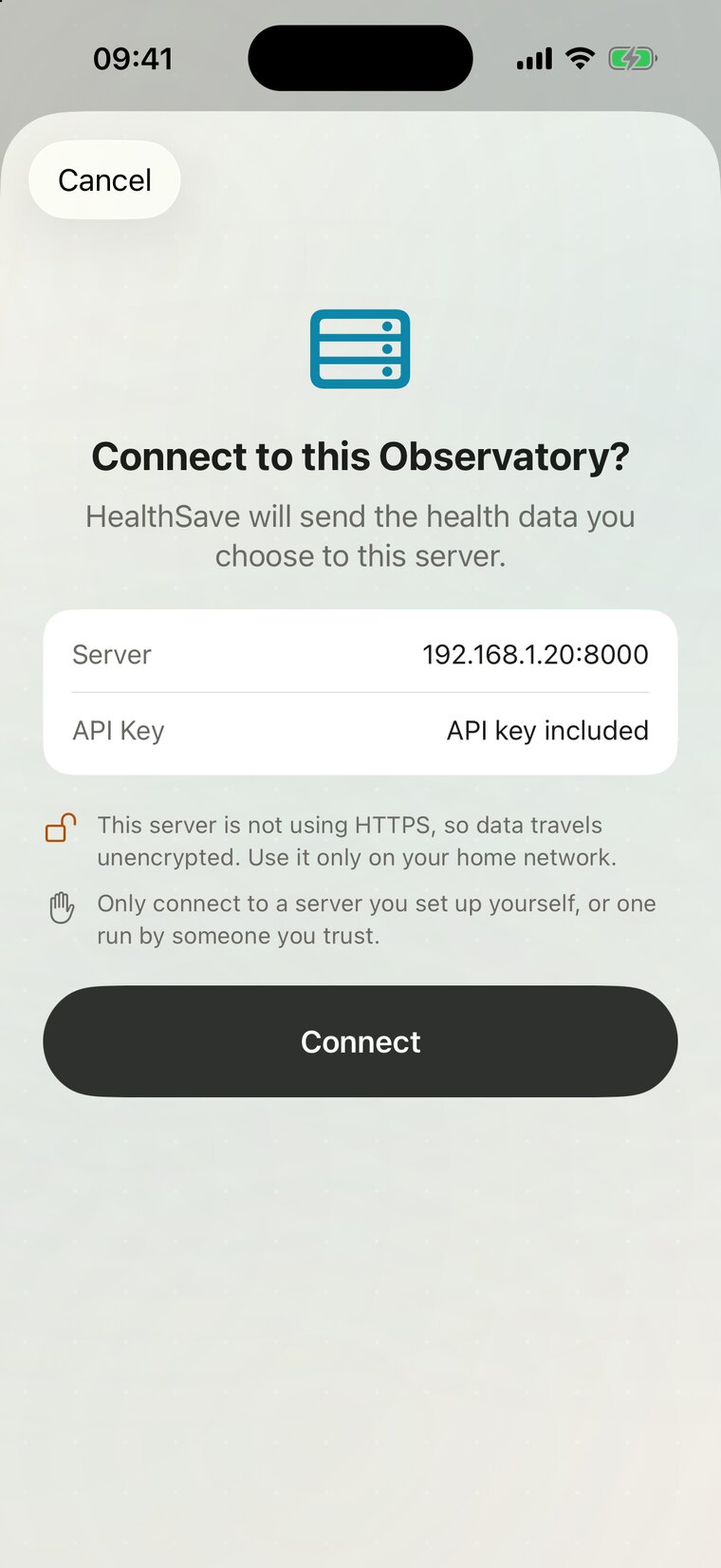
localhost means the iPhone itself. Use the LAN address that healthsave pair prints.First sync
Tap Sync New Data in Server Sync. A long history can take a while to upload. After that, HealthSave syncs in the background at the cadence you pick. iOS decides the exact timing and may delay it for hours, so don't build anything safety-critical on it.
Then open the dashboard. Readings appear as soon as they land. Baselines and findings need more days of data, so a newly synced history will show more than a brand-new Apple Watch.
Day to day
| Command | What it does |
|---|---|
healthsave status | Shows what is running |
healthsave logs api | Shows logs for one service |
healthsave down | Stops the stack and keeps your data |
healthsave update | Takes a backup, moves to the newest release and restarts what was running |
healthsave backup | Writes the database, .env and config.yaml to one file |
healthsave restore <file> | Restores a backup, after saving the current database first |
A backup holds your health data and your secrets. Encrypt it before it leaves the machine.
Optional layers
Local AI narration
healthsave setup advancedAdvanced setup checks your RAM and GPU, recommends an Ollama model and pulls it. The model narrates findings the statistics engine has already computed.
Home Assistant over MQTT
HA_MQTT_ENABLED=true healthsave up --mqtt --home-assistantThis starts a bundled broker and the bridge, and Home Assistant discovers the entities. To use a broker you already run, follow the Home Assistant guide. If you only want sensors, HealthSave Pro can talk to Home Assistant directly, with no Observatory at all.
Your own charts
Grafana ships with SQL-backed dashboards over your database. See Apple Health to Grafana.
Away from home
Observatory is built for a private network. To use it beyond your LAN, put a reverse proxy that terminates HTTPS in front of it and never publish port 8000 directly. The reverse proxy guide has a Caddy example. Read the security model first.
If something fails
| What you see | What to try |
|---|---|
| "Docker is not running", but it is | Docker can answer slowly on a busy machine. Run the command again. |
| The iPhone can't reach the server | Use the LAN address, not localhost. Check that you allowed Local Network access and that the host firewall allows port 8000. |
| The server answers 401 | The key doesn't match. Run healthsave pair and enter the key it prints. |
| Findings are empty | Sync more days first. Then check healthsave logs worker. |
| A service won't start | Run healthsave doctor, then healthsave logs <service>. |
The full documentation lives on GitHub. Stuck? Write to support@healthsave.app.