 HealthSave
What HealthSave can see
None of your health data. Your iPhone sends it directly to your server. There is no HealthSave account for Observatory and no HealthSave server in the path. The stack makes no outbound calls you did not turn on: Grafana's usage reporting and update checks are off, and the AI library runs with its telemetry off.
You can check this. The source is on GitHub, under the Elastic License 2.0.
What can leave your server
Nothing, until you turn something on. There are two separate ways out, and they follow different rules.
Cloud AI, through the egress gate
Narration is off until you set it up, and local through Ollama if you choose that. If you deliberately point it at a cloud model, a default-deny gate decides what may cross.
| Data | To a cloud model |
|---|---|
| Raw readings | Never |
| Derived findings | Only if you opt in, redacted on your server first |
| Aggregates and summaries | Only if you opt in, redacted on your server first |
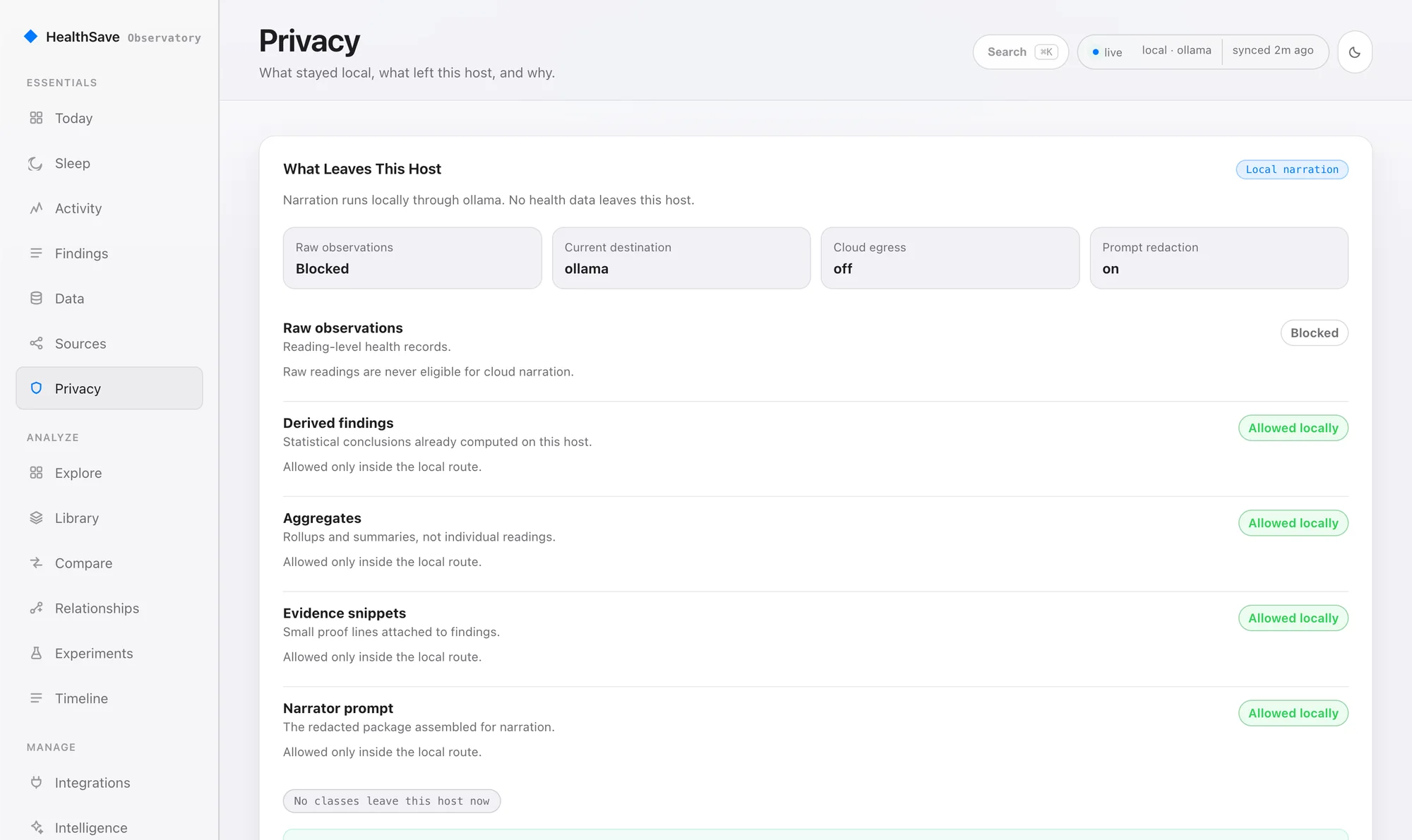
Routes you configure, outside the gate
The Home Assistant MQTT bridge, exports and Grafana send data where you point them, and they don't pass through the egress gate. That is the point of a route, but it means they can carry raw readings. Treat each one as a place your health data now lives. Plugins you enable, such as Whoop and Amazfit, call those vendors to fetch your data.
Defaults at install
These apply when you install with healthsave setup or the installer.
- API key. Setup generates a long random key. Requests without it are rejected.
healthsave pair --new-keyreplaces it. - Dashboard sign-in. Setup generates a password. Without a session, every page redirects to sign-in and data routes return 401. Ten wrong passwords in a minute pause sign-in for a minute.
- Bound to this machine. The web dashboard, Grafana and the database listen on localhost until you change that. Only the API is on your network.
- Stored tokens. Plugin OAuth tokens are encrypted at rest.
- MQTT. On new installs, the bundled broker requires a login.
docker compose up starts without a key as a local demo, and the API logs a warning on every start. Use healthsave setup for real data. healthsave doctor flags a missing key.Keep it on your network
The threat model assumes a private network where you trust the people on it. It isn't designed to be published on the open internet over plain HTTP.
- API (8000): keep it on your LAN. For remote access, put an HTTPS reverse proxy in front of it.
- Grafana (3000): set a strong password and don't publish it.
- Database (5432): never publish it.
- /metrics: this endpoint has no key by design, so a Prometheus scraper can reach it on your network. Protect it behind the proxy if you expose it.
Known limits
- One shared API key. Every client holds the same access. Scoped read tokens are planned.
- No built-in TLS. The API speaks plain HTTP, and HTTPS is your reverse proxy's job.
- LAN trust is assumed. If untrusted devices share your network, segment it and front the stack with a proxy.
- One dashboard password. There are no separate accounts. With no password set, sign-in is off, which is only safe while the dashboard stays bound to localhost.
- The stack doesn't encrypt your health data. Use disk encryption on the host: FileVault, LUKS or an encrypted NAS volume.
- Cookies are shared across ports. Other web apps on the same host can see the session cookie. Give the dashboard its own hostname behind your proxy if that matters to you.
Backups
healthsave backup writes one file with your database and your .env secrets. Protect it like the live server. Encrypt it before it goes off the machine, and restrict who can read the backup location.
Report a vulnerability
Email support@healthsave.app with SECURITY in the subject. Include your version, what an attacker needs and how to reproduce it. Please don't open a public issue, and don't test against an Observatory you don't own. HealthSave is maintained by one person, so you will get a human reply, usually within a few days. Only the newest release gets fixes.